Evaluating the 3D Logo Mockup on Green Wall for Professional Presentations
In the competitive landscape of brand identity design, the presentation of a logo is often just as critical as the design itself. Clients and stakeholders rarely view a logo in isolation; they need to visualize how it exists in physical space. This is where high-quality mockups become essential tools for designers and marketers. Specifically, the 3d Logo Mockup on Green Wall has emerged as a popular resource for those seeking to showcase branding with a modern, organic, or eco-friendly aesthetic. This article explores the utility, features, and strategic value of this specific mockup template, helping you determine if it aligns with your project requirements.
Understanding the Utility of 3D Logo Mockups
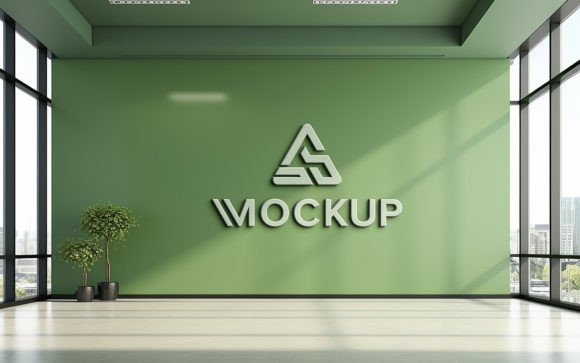
A 3D logo mockup is a digital file, typically in PSD (Photoshop Document) format, that simulates a real-world environment. Instead of presenting a flat, two-dimensional vector file, designers use these templates to place their logos onto textured surfaces, such as walls, paper, glass, or fabric. The 3d Logo Mockup on Green Wall specifically places the design against a textured, green-painted surface. This choice of background is not arbitrary; green is frequently associated with nature, growth, sustainability, and calmness. Therefore, this mockup is particularly effective for brands in the wellness, environmental, agricultural, or organic sectors.
The primary function of this tool is to bridge the gap between digital design and physical reality. By using advanced lighting and shadow mapping, the mockup ensures that the inserted logo appears to be part of the scene rather than simply floating above it. This level of realism helps clients make more informed decisions about their branding, as they can better judge scale, contrast, and visual impact.
Key Features and Technical Specifications
When evaluating any design asset, understanding its technical capabilities is crucial for workflow efficiency. The 3d Logo Mockup on Green Wall is designed with user accessibility in mind, regardless of technical proficiency. Below are the core features that define its usability:
- Smart Object Replacement: The most significant feature is the inclusion of Smart Objects. This allows users to double-click a specific layer, paste their logo or text, and save. The software automatically applies the correct perspective, distortion, and blending modes. This means no manual warping or complex masking is required.
- Realistic Lighting and Shadows: The template comes pre-rendered with high-quality 3D lighting. When you insert your design, it automatically inherits the ambient occlusion and drop shadows of the wall texture. This creates a convincing illusion that the logo is painted on or mounted to the surface.
- High Resolution and Print Readiness: With a resolution of 300 DPI (dots per inch), the file is suitable for both high-resolution digital displays and print materials. This ensures that the texture of the green wall remains crisp and detailed, avoiding pixelation even when viewed closely.
- Organized Layer Structure: The PSD file is fully layered and well-organized into folders. This structure allows users to easily locate the smart object layer, adjust background colors if necessary, or tweak lighting settings without navigating a chaotic layer stack.
- No Skill Requirement: Because the heavy lifting is done by the template’s internal scripts and smart filters, users do not need advanced Photoshop skills. Basic knowledge of opening files and saving layers is sufficient.
The pack typically includes one PSD file for editing and one JPG file for quick previewing or immediate use if no customization is needed. This streamlined package ensures that the asset is ready to use immediately upon download.
Strategic Benefits for Brand Presentation
Why choose a green wall specifically? The context of a mockup influences the perceived value of the brand. A 3d Logo Mockup on Green Wall offers several strategic advantages:
First, it evokes specific psychological responses. Green is universally recognized as a color of balance and harmony. For companies focusing on sustainability, eco-tourism, or natural products, this background reinforces their brand message subconsciously. It provides a contextual narrative that a plain white or black background cannot achieve.
Second, the textured surface adds depth. Flat designs can sometimes feel sterile or incomplete. The imperfections and grain of the wall texture add character and authenticity to the presentation. This "wabi-sabi" element—the appreciation of imperfection—can make a brand feel more approachable and human-centric.
Third, it saves time and resources. Creating a realistic 3D render from scratch requires specialized software like Blender or Cinema 4D, along with significant rendering time. Using a pre-made mockup allows designers to achieve similar results in minutes, freeing up time for other aspects of the project.
Considerations and Tradeoffs
While the benefits are clear, it is important to approach this tool with a balanced perspective. There are situations where this specific mockup may not be the ideal choice.
Color Contrast Issues: The dominant green hue of the wall can clash with certain logo color palettes. If a logo contains similar shades of green or low-contrast colors, it may get lost against the background. Designers must ensure their logo has sufficient contrast, possibly by adding a border or adjusting the brightness within the smart object settings.
Limited Customization of Environment: While the layers are editable, the fundamental geometry of the wall is fixed. If a project requires a specific architectural style, such as brick, concrete, or wood, this green plaster wall will not be suitable. It is a niche tool rather than a universal solution.
Overuse and Generic Appeal: As mockups become more accessible, there is a risk of overuse. If many competitors in the same industry use identical or very similar mockups, the presentation may lose its uniqueness. It is advisable to use this tool as part of a broader portfolio that includes varied presentations.
When to Use This Mockup vs. Alternatives
To make an informed decision, consider the specific goals of your project. The 3d Logo Mockup on Green Wall is a strong fit in the following scenarios:
- Eco-Friendly Branding: When presenting identities for organic food brands, sustainable fashion lines, or environmental NGOs.
- Wellness and Health: For spas, yoga studios, or mental health apps where calmness and nature are central themes.
- Quick Client Approvals: When you need to send a professional-looking preview quickly without spending hours on custom rendering.
However, alternatives may be worth considering if:
- Corporate Formality is Required: For law firms, financial institutions, or tech giants, a sleek metal, glass, or minimalist white background might convey professionalism more effectively than a textured green wall.
- Specific Material Accuracy is Needed: If the client wants to see how the logo looks on a specific material like brushed aluminum or marble, a generic wall mockup will not suffice. In these cases, material-specific mockups are necessary.
- Full Scene Context is Desired: If the goal is to show the logo in a busy street scene or an interior office setting, a single-wall mockup may feel too isolated. Comprehensive scene creators or 3D software might be better suited for these complex narratives.
Final Decision-Making Insights
Integrating the 3d Logo Mockup on Green Wall into your design workflow can significantly enhance the perceived quality of your presentations. Its ease of use, driven by smart object technology, makes it accessible to designers of all skill levels. The 100% editable nature of the file ensures that you retain control over the final output, allowing for minor tweaks to lighting or color if needed.
Before purchasing or downloading, evaluate your current project pipeline. Do you have clients in the sustainability or wellness sectors? Do you need a quick, high-quality way to visualize logos in a natural context? If the answer is yes, this mockup is a valuable addition to your toolkit. Remember to rate the product after use, as feedback helps creators improve future assets and assists other designers in making informed choices.
Ultimately, the value of a mockup lies in its ability to tell a story. The green wall tells a story of nature, stability, and growth. If that story aligns with your brand’s identity, this tool will serve you well. If not, explore other textures and environments that better match your specific narrative needs. By selecting the right context for your design, you ensure that your logo is not just seen, but felt and understood.