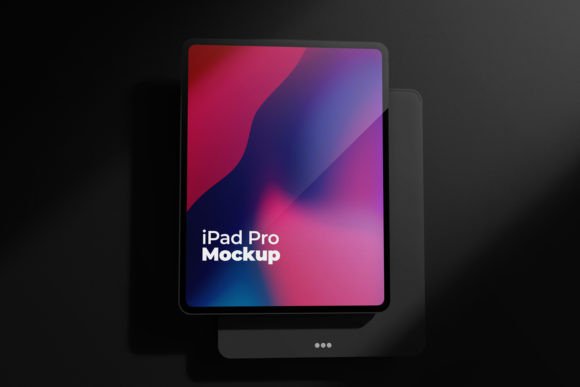
Elevate Designs with iPad Pro 3D Mockups
In the fast-paced world of digital design, presentation is often just as critical as the work itself. You might have spent hours perfecting a user interface, crafting a stunning app layout, or designing an engaging ebook cover, but if you present it as a flat, two-dimensional file, it risks getting lost in the noise. This is where a high-quality iPad Pro Screen Mockup 3D becomes an indispensable tool for modern creatives. It bridges the gap between abstract design files and tangible reality, allowing clients and audiences to visualize exactly how a product will look in the real world.
For professionals ranging from freelance UI/UX designers to marketing agency directors, the ability to showcase work realistically can be the difference between securing a contract and being passed over. A professional market-ready mockup does more than just display an image; it adds context, depth, and credibility to your portfolio. By utilizing a multi-layered design with realistic lighting and perspective, you transform a simple screenshot into a compelling visual narrative that speaks directly to your audience’s imagination.
Why Realism Matters in Digital Presentation
The human brain processes visual information significantly faster than text, and we are naturally drawn to objects that appear three-dimensional and tactile. When you use an iPad Pro Screen Mockup 3D, you are leveraging this psychological preference. A flat JPEG of an app interface tells a viewer what the colors and buttons look like. A 3D render, however, tells them how the device feels in hand, how the screen reflects ambient light, and how the design integrates with a premium hardware aesthetic.
This level of detail is crucial for building trust. When potential clients see your work presented on a sleek, modern device with accurate shadows and reflections, they subconsciously associate your design skills with professionalism and high standards. It suggests that you care about the final user experience, not just the raw code or graphics. This is particularly important in technology-related projects where the perceived quality of the hardware often influences the perceived quality of the software running on it.
Key Features of a Premium Mockup Template
Not all mockups are created equal. To truly stand out, you need a template that offers flexibility without sacrificing quality. The ideal iPad display template should provide a robust foundation for customization while maintaining a photorealistic appearance. Here are the essential characteristics that define a top-tier mockup:
- High-Resolution Output: Look for dimensions such as 4000 px by 2667 px at 300 DPI. This ensures that your final images remain crisp and clear, even when viewed on large retina displays or printed in high-quality portfolios.
- Smart Object Functionality: Time is money. A layered iPad mockup with smart object features allows you to simply drag and drop your design into a designated layer. The template automatically handles perspective warping, lighting adjustments, and shadow casting, saving you hours of manual editing.
- Multi-Layered Flexibility: Different projects require different presentations. A versatile mockup includes various screen types and square layouts, enabling you to showcase everything from full-screen apps to widget-heavy home screens.
- Realistic Lighting and Texture: The best 3D render mockups simulate real-world physics. This includes subtle screen glare, bezel details, and accurate depth of field, which contribute to the overall authenticity of the image.
Practical Applications Across Industries
The utility of an iPad Pro Screen Mockup 3D extends far beyond simple portfolio pieces. Its applications are diverse, catering to a wide range of professional needs across personal, commercial, and educational environments.
For UI/UX Designers and Developers
When pitching a new app concept or presenting a case study, context is king. Using a realistic device mockup allows you to demonstrate how your interface adapts to the specific aspect ratio and resolution of the iPad Pro. It helps stakeholders visualize the user journey in a familiar setting, making feedback more constructive and focused on the actual user experience rather than abstract layout concerns.
For Marketers and Brand Strategists
Marketing materials thrive on aspiration. Whether you are creating social media ads, landing page headers, or email newsletters, featuring your digital product on a premium device elevates the brand identity. RAM STUDIO’s mockup approach, for instance, focuses on effectively presenting brand identity to make a lasting impression. By placing your logo or campaign visuals within a high-end 3D environment, you signal to customers that your brand is modern, trustworthy, and technologically advanced.
For Educators and Content Creators
Educational technology is booming, and creators often need to showcase e-books, online courses, or interactive learning modules. An iPad mockup provides a perfect frame for these digital products. It helps potential students visualize the learning experience, making intangible digital goods feel more substantial and valuable. This is particularly effective for sales pages where converting visitors into buyers requires a strong visual hook.
Enhancing Efficiency and Workflow
Beyond aesthetics, adopting a standardized, high-quality mockup system improves workflow efficiency. Instead of searching for new angles or trying to photograph physical devices under inconsistent lighting conditions, designers can rely on a consistent library of assets. This consistency is vital for maintaining a cohesive brand voice across multiple platforms.
Furthermore, the ease of customization means that iterating on designs becomes less cumbersome. If a client requests a change in the background color or a different screen orientation, a well-structured layered file allows for quick adjustments. This agility enables freelancers and agencies to respond rapidly to feedback, enhancing productivity and client satisfaction.
Choosing the Right Mockup for Your Needs
When selecting an iPad design template, consider the specific tone of your project. Do you need a clean, minimalistic look for a corporate presentation, or a more dynamic, lifestyle-oriented angle for a consumer app? Ensure the mockup you choose supports the resolution requirements of your target platforms. For web use, standard high-definition is sufficient, but for print or large-format displays, the 300 DPI resolution mentioned earlier is non-negotiable.
Additionally, check for compatibility with your design software. Most professional mockups are designed for Adobe Photoshop, leveraging its smart object capabilities. Ensuring that your team is proficient with these tools will maximize the value you get from the template.
Final Thoughts on Visual Impact
In an increasingly digital marketplace, the way you present your work can significantly influence its perceived value. An iPad Pro Screen Mockup 3D is not just a decorative element; it is a strategic communication tool. It helps clarify complex ideas, enhances brand perception, and ultimately drives engagement. By investing in high-quality, realistic rendering tools, you empower yourself to tell a more compelling story about your designs. Whether you are launching a new app, selling digital content, or refining your portfolio, the right mockup can help you make a lasting impression that resonates with your audience long after they have scrolled past.