Unicorn Shadow Box 3D SVG Papercut File: A Guide to Layered Digital Crafting
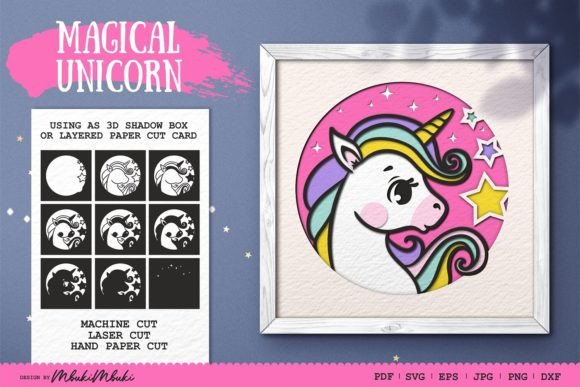
The Unicorn Shadow Box 3D SVG Papercut File represents a specific category of digital crafting assets designed for layered paper art. This product is a pre-designed, multi-layered vector file that allows crafters to create depth and dimension using cardstock or similar materials. Specifically, this design features a magical unicorn theme, organized into ten distinct layers that fit within a 9x9-inch frame. For individuals interested in papercrafting, understanding the structure, compatibility, and practical application of such files is essential before beginning a project.
Understanding the Structure of Layered SVG Files
A shadow box design differs significantly from standard single-layer cut files. The Magical Unicorn SVG included in this package is engineered to create a three-dimensional effect when assembled. The design consists of ten separate layers. When stacked with spacers or foam tape between each layer, these components create a sense of depth, drawing the viewer’s eye into the scene. The base layer typically serves as the background, while subsequent layers add foreground elements, such as the unicorn silhouette, clouds, stars, or framing details.
The file is provided in a 9x9-inch format, which is a standard size for many square shadow box frames available at craft stores. However, because the source files are vectors (SVG, EPS, DXF), they can be scaled. This scalability is a critical feature for users who wish to adapt the design to larger frames or different aspect ratios, although maintaining the proportional integrity of the layers is important for proper alignment during assembly.
File Formats and Machine Compatibility
One of the primary considerations when selecting a digital cut file is compatibility with your hardware. This Unicorn Shadow Box 3D SVG Papercut File is distributed in a ZIP folder containing multiple formats to ensure broad usability. The inclusion of SVG, DXF, EPS, and PDF files means the design is suitable for use with Cricut, Silhouette, Brother ScanNCut, and other popular cutting machines.
- SVG Folder: Contains individual layers, ideal for Cricut Design Space and other web-based design software.
- DXF Folder: Contains individual layers, often preferred by Silhouette Studio users. It is important to note that DXF files should be opened with units set to 1 mm or scaled to a height of 9 inches to ensure correct dimensions.
- EPS Folder: Suitable for professional graphic software like Adobe Illustrator. This format allows for advanced editing of vector paths.
- PDF and Image Files: The package includes PNG and JPG folders with individual layers at 300 DPI. These are useful for hand-cutting references or for users who do not own cutting machines. A flipped JPG version is also included to assist with hand-cutting precision.
The availability of individual layers in each format is a significant advantage. It allows the crafter to isolate specific elements, change colors digitally to preview the final look, or remove layers if a simpler design is preferred. This flexibility supports both automated machine cutting and manual crafting methods.
Benefits and Creative Potential
The primary benefit of using a pre-made layered file like the Magical Unicorn SVG is time efficiency. Designing a balanced 3D shadow box from scratch requires a strong understanding of spatial relationships, layering order, and structural support. By using a tested template, crafters can bypass the design phase and focus on material selection, cutting, and assembly.
Furthermore, the ability to change colors digitally offers extensive customization. Users can experiment with different color palettes to match room decor or personal preferences before cutting any paper. For example, switching from pastel tones to vibrant neons can completely alter the mood of the piece. This trial-and-error process is risk-free when done digitally, ensuring that the final physical product meets expectations.
These files are particularly well-suited for creating personalized gifts, nursery decor, or greeting cards. The 3D effect adds a premium, handmade quality that flat prints cannot achieve. For those selling handmade goods, offering a shadow box made from a high-quality layered file can increase perceived value.
Considerations and Tradeoffs
While layered SVG files offer creative advantages, there are tradeoffs to consider. The most significant challenge is the assembly process. Aligning ten layers precisely requires patience and attention to detail. Even minor misalignments can disrupt the 3D illusion. Crafters must be prepared to use precise spacing tools, such as uniform foam tape or cardboard spacers, to maintain consistent depth between layers.
Material selection is another critical factor. Not all cardstocks are suitable for intricate papercutting. Thin papers may tear during weeding, while overly thick boards may not bend easily around tight curves. Testing cuts on scrap material is recommended to determine the optimal blade depth and speed settings for your specific machine.
Additionally, the complexity of the design means that cutting times will be longer than simple projects. Each of the ten layers must be cut, weeded, and aligned. For large-scale production, this time investment must be factored into pricing or scheduling.
When This File Is a Strong Fit
The Unicorn Shadow Box 3D SVG Papercut File is an excellent choice for intermediate to advanced crafters who have experience with layered projects. It is ideal for those who own a cutting machine and want to create a visually striking piece without designing the artwork themselves. It is also suitable for educators or workshop leaders looking for a structured project that teaches layering techniques.
If you are creating decor for a child’s room, a baby shower, or a fantasy-themed event, this design aligns well with those aesthetics. The magical unicorn motif is versatile and widely appealing. Moreover, if you have access to a variety of colored cardstocks, the ability to customize the palette makes this file a flexible option for matching specific interior design schemes.
When to Consider Alternatives
For beginners, a ten-layer shadow box may be overwhelming. If you are new to papercrafting, it may be wise to start with simpler, two or three-layer designs to master alignment and spacing techniques before tackling a complex project like this. Additionally, if you do not have a cutting machine, the hand-cutting route, while possible with the included PDF and JPG guides, will be extremely time-consuming due to the intricate details of the unicorn and background elements.
If your goal is rapid production of simple greeting cards, a flat, single-layer SVG might be more efficient. Shadow boxes require framing and deeper construction, which adds to the material cost and assembly time. In cases where budget or time is strictly limited, simpler alternatives may be more practical.
Practical Decision-Making Insights
Before purchasing or downloading the Unicorn Shadow Box 3D SVG Papercut File, evaluate your current skill level and available tools. Ensure your cutting machine is calibrated correctly, as precise cuts are vital for clean layering. Check that you have sufficient cardstock in the colors you plan to use, as running out of a specific shade mid-project can delay completion.
Consider the end use of the project. If it is for a gift, allow extra time for assembly and potential troubleshooting. If it is for sale, calculate the cost of materials, including the frame, spacers, and backing board, to ensure profitability. By understanding the requirements and potential challenges, you can determine whether this layered design aligns with your crafting goals and capabilities.
In conclusion, this digital file offers a robust framework for creating detailed 3D paper art. With the right preparation and attention to detail, it can result in a professional-quality decorative piece that highlights the beauty of layered papercrafting.