Evaluating the 3D Memorial Picture Shadowbox Frame SVG for Crafters and Small Businesses
In the realm of digital crafting, few projects carry as much emotional weight as memorial keepsakes. Creating a tribute that honors a loved one requires not only technical precision but also a design that conveys respect and warmth. The 3D Memorial Picture Shadowbox Frame SVG by Harbor Grace Designs addresses this specific need, offering a structured yet customizable solution for crafters working with cutting machines. This digital asset is designed to facilitate the creation of layered, three-dimensional frames that hold photographs securely while adding depth and visual interest through paper layering techniques.
For professionals, small business owners, and serious hobbyists, understanding the nuances of such a file is essential before integrating it into a workflow. This evaluation explores the practical applications, file quality, and operational considerations of this specific design, helping you determine if it aligns with your creative goals and technical capabilities.
Design Structure and Functional Purpose
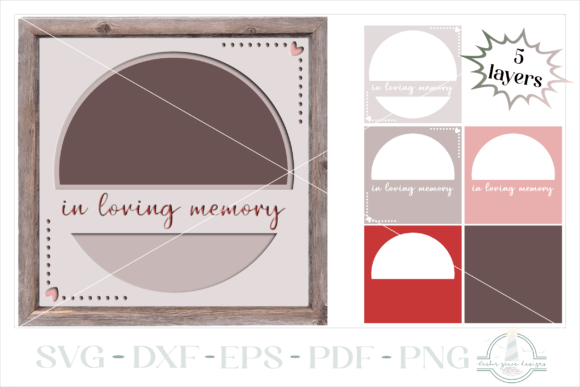
The core value of the 3D Memorial Picture Shadowbox Frame SVG lies in its engineering for layering. Unlike flat prints or simple cutouts, a shadowbox design relies on the strategic stacking of materials to create depth. This particular file includes the necessary components to build a frame that surrounds a central photograph, typically accompanied by the phrase "In Loving Memory." The design is exclusive to Harbor Grace Designs, which implies a level of curation and attention to detail that generic marketplace files may lack.
The primary purpose of this asset is to streamline the production of memorial gifts. Whether for funeral services, anniversary remembrances, or personal home decor, the frame provides a dignified presentation for a cherished photo. The 3D aspect is achieved through multiple layers of cardstock or similar materials, each slightly smaller than the last, creating a recessed area for the picture. This structure not only protects the photograph but also draws the viewer’s eye inward, focusing attention on the subject of the memorial.
File Formats and Technical Compatibility
Versatility in file formats is a critical factor for any digital cutting file. The download package for this design includes a single zip folder containing the design in SVG, DXF, EPS, PDF, and PNG formats. This comprehensive selection ensures compatibility with a wide range of software and hardware setups.
- SVG (Scalable Vector Graphics): Ideal for users of Cricut Design Space, Silhouette Studio (Designer Edition), and other vector-based cutting software. It allows for easy resizing without loss of quality.
- DXF (Drawing Exchange Format): Essential for Silhouette Studio Basic Edition users who cannot import SVGs without a paid upgrade.
- EPS (Encapsulated PostScript): Suitable for professional graphic designers using Adobe Illustrator or CorelDRAW who may wish to modify the design further before cutting.
- PDF: Useful for manual cutting or printing references, providing a static view of the layout.
- PNG: Saved at 300dpi, these images are high-resolution and suitable for sublimation printing or digital mockups, though they are not vector files for cutting.
The inclusion of high-resolution PNGs at 300dpi is a notable strength. Many sellers provide low-resolution previews, but having print-ready raster files adds value for those who might want to incorporate the design into printed stationery or digital tributes alongside the physical craft project.
Practical Usability and Cutting Considerations
While the design is marketed as a memorial frame, its usability extends to various paper crafting scenarios. However, successful execution depends heavily on machine settings and material choice. The listing notes that if the purchase includes intricate mandala designs, users should cut at a larger scale and slower speed. While this specific memorial frame may not be as complex as a mandala, the principle of careful cutting applies. Layered designs require precise cuts to ensure that each tier aligns perfectly. Misaligned layers can disrupt the 3D effect and diminish the professional appearance of the final product.
For optimal results, it is recommended to use heavy-weight cardstock, typically 65lb to 80lb, to maintain the structural integrity of the frame. Thinner papers may warp or fail to stand off the background properly, reducing the shadowbox effect. Additionally, users should check their machine settings before cutting. A fine-point blade is generally sufficient, but ensuring the blade is sharp and the mat grip is appropriate for the material will prevent shifting during the cut process.
It is important to note that project idea photos provided by the seller are for inspirational purposes only. Background images, colors, and the photograph itself are not included with the purchase. This is a standard practice in digital downloads, but it requires the buyer to have access to their own materials and photos. For small business owners, this means factoring in the cost of cardstock and adhesive when pricing the final product.
Target Audience and Professional Applications
Who benefits most from the 3D Memorial Picture Shadowbox Frame SVG? The audience is broad, ranging from individual crafters to commercial entities.
- Small Business Owners and Etsy Sellers: Memorial items are a consistent niche in the handmade market. This SVG allows for the rapid production of high-perceived-value items. By sourcing affordable cardstock and utilizing efficient cutting workflows, sellers can create premium-looking tributes with healthy profit margins.
- Funeral Directors and Memorial Service Providers: Offering customized keepsakes as part of a service package can enhance client satisfaction. Having a reliable digital file allows for quick customization with different names or dates if the design permits, or simply producing uniform, high-quality frames for families.
- Serious Hobbyists and Family Crafters: For individuals creating gifts for friends or family experiencing loss, this design provides a professional template that eliminates the guesswork of designing a layered frame from scratch. It ensures symmetry and proportion, which can be challenging to achieve manually.
- Educators and Workshop Leaders: Those teaching paper crafting classes can use this file to demonstrate layering techniques. It serves as a practical example of how 2D cuts translate into 3D objects.
Quality, Consistency, and Long-Term Value
The long-term value of a digital asset like this lies in its reusability. Unlike physical dies, which can rust, bend, or become lost, an SVG file remains accessible indefinitely. Once purchased, the 3D Memorial Picture Shadowbox Frame SVG can be used for unlimited personal and commercial projects, depending on the license terms provided by Harbor Grace Designs. This makes it a cost-effective investment for frequent crafters.
Quality consistency is another advantage. Digital files do not degrade over time. Every cut will be identical, ensuring that if you are producing multiple units for an event or inventory, each piece meets the same standard. This reliability is crucial for professionals who need to deliver consistent results to clients.
However, there are limitations to consider. The design is static; while you can resize it, you cannot easily alter the fundamental shape or text without advanced vector editing skills. If you require highly personalized text beyond the standard "In Loving Memory," you may need to combine this frame with other text elements or choose a different design. Additionally, the success of the project relies on the user’s skill in assembly. Glue placement, layer alignment, and photo mounting are manual processes that require patience and precision.
Final Recommendations for Implementation
To maximize the effectiveness of the 3D Memorial Picture Shadowbox Frame SVG, approach the project with a focus on preparation. Test cut a single layer on scrap paper to verify dimensions and fit before committing to your final cardstock. Choose contrasting colors for the layers to accentuate the depth, or monochromatic tones for a subtle, elegant look. Ensure your photograph is printed on high-quality photo paper or cardstock to match the durability of the frame.
In conclusion, this digital file offers a robust, professional-grade solution for creating meaningful memorial keepsakes. Its multi-format compatibility, high-resolution assets, and thoughtful design make it a valuable addition to the toolkit of crafters and small business owners alike. By understanding the technical requirements and planning the assembly process carefully, users can produce touching, high-quality tributes that honor memories with dignity and style.